One video in.
A 3D world out.
Portal turns a casual walk-through video of any space into an explorable, web-ready 3D Gaussian Splat — no rig, no LiDAR, no app. Scroll to watch it happen.
loading splat
The primitive
What is a Gaussian Splat?
Millions of these fuzzy ellipsoids overlap to form a photoreal, renderable scene.
It is not a mesh. A scene is millions of tiny, fuzzy, colored 3D ellipsoids — “Gaussians.” A differentiable renderer “splats” them onto your screen, and gradient descent nudges every one until the render matches your photos. The result renders in real time, in a browser, and captures soft, complex things — fabric, foliage, glass — that meshes choke on.
Where the blob sits in 3D space.
Its size, stretch and orientation — a squashed ellipsoid.
Color that changes with viewing angle — gives real sheen, glints, reflections.
How solid vs see-through it is. Thousands overlap to build a surface.
The pipeline
Six steps from video to splat
Every stage is swappable. Below each step: what it does, why we picked that tool, and the lever that pushes PSNRPSNR (peak signal-to-noise ratio) measures how closely the rendered 3D scene matches the original photos, in decibels. Higher is better: under 20 is rough, 25–30 looks good, 30+ is near-photoreal. up — a quality score for how closely the 3D render matches the real photos (higher = sharper; 30+ ≈ near-photoreal).
Capture
4K phone videothe space→one 4K clipWalk the space once, slowly and steadily, holding a single continuous 4K video.
◆ Why this choice
Resolution + sharpness + parallax set the quality ceiling before any algorithm runs. We translate (not pan) so every surface is seen from several positions, keep ~70–80% overlap, and close the loop.
↑ Push PSNR higher
Shoot 4K not 1080p · kill motion blur (slow, steady, fast shutter) · even lighting · avoid mirrors/glass · cover each surface from 3+ angles.
Frame extraction
uniform samplingvideo→~600 framesSample ~600 evenly-spaced frames, scaled to ~1920 px on the long side.
◆ Why this choice
Uniform spacing preserves frame overlap (motion-gating thinned it and fragmented our reconstruction). Shooting 4K still pays off — a 4K frame scaled to 1920 is sharper and less noisy than native 1080p. We work at 1920 because SfM + training cost scales with pixels, and the Gaussian budget (not input pixels) usually limits detail first.
↑ Push PSNR higher
600 frames for a room, 1000+ for a venue · keep ~70% overlap · raise the working resolution for finer detail — costs more Gaussians + VRAM, diminishing returns.
Neural matching
hloc · ALIKED + LightGlueframes→feature matchesFor each frame, retrieve its 32 most-similar frames, detect learned ALIKED keypoints, and match them with LightGlue.
◆ Why this choice
Learned features beat hand-crafted SIFT across changing light, viewpoint and low texture — the exact conditions that break classic SfM. Retrieval avoids O(n²) matching, so it scales to hundreds of frames.
↑ Push PSNR higher
More retrieval pairs → more loop closures around tiers/aisles · swap detector (DISK / SuperPoint) for dark interiors.
Structure-from-Motion
GLOMAP (global SfM)matches→poses + point cloudSolve every camera pose and a sparse 3D point cloud at once, then gravity-align the scene.
◆ Why this choice
A global solve is loop-robust and ~10× faster than incremental COLMAP, which fragments when you walk back past where you started. Alignment fixes 'up' so seat cameras sit at correct eye-height.
↑ Push PSNR higher
Tuned inlier thresholds · orientation align · GPU feature extraction · accurate poses are the single biggest PSNR driver.
Splat training
gsplat MCMC + bilateral gridposes + images→millions of GaussiansOptimize millions of Gaussians to match the photos, with per-image exposure correction.
◆ Why this choice
MCMC keeps a fixed Gaussian budget, makes far fewer floaters, and tolerates imperfect init. The bilateral grid corrects phone auto-exposure drift between frames → truer color (our single biggest visible win vs plain training).
↑ Push PSNR higher
Full SH3 color · --antialiased (Mip-Splatting, ≈ +1 PSNR) · opacity / scale regularization to kill floaters · more Gaussians + more steps.
Export & serve
SH3 .ply → .spz / .sog + LODGaussians→web splatExport a standard SH3 .ply, compress to a streaming format, and serve to a browser viewer.
◆ Why this choice
Compression keeps files web-friendly with no visible quality loss; level-of-detail scales the same pipeline from a single object up to a full venue.
↑ Push PSNR higher
Aggressive compression for mobile · bake per-seat camera presets · stream LOD tiles for large spaces.
Capability
How much video can it eat?
We sub-sample any clip down to a target frame count, so video length is not the hard limit — coverage and frame count are. GPU memory scales with the number of Gaussians, not the minutes of footage. Sweet spot: 2–5 minutes of steady 4K.
| Video length (4K) | Frames used | Pose + train · 1×A100 | Best for |
|---|---|---|---|
| ≤ 1 min | 600 | ~25 min | single object · small room |
| 1 – 5 minsweet spot | 600 – 1000 | ~30 – 50 min | room · theatre · gallery |
| 5 – 10 min | 1000 – 1500 | ~1 – 1.5 hr | large venue · multi-room |
| 10 min + | streaming / LOD | scales linearly | full attraction tour |
Timings on a single NVIDIA A100. Longer / larger spaces use more frames (proportionally more compute) or hierarchical streaming reconstruction.
At Headout
Three experiences, one engine
Every Headout listing is a place or a thing someone is deciding to book. Portal lets them experience it first — from the same simple phone capture.
See the view from your seat
One splat per venue. Render the stage from every seat's exact position and eye-height, so a buyer previews the view from row J before they pay for it.
Constrained POV · seat→camera coordinates baked in
Inspect it from every angle
An object-centric splat of a sculpture, statue, exhibit or landmark detail. Customers orbit, zoom and study it — the artifact, not a flat photo gallery.
Orbit viewer · turntable presets
Step inside before you go
Street-view-style POV movement along a guided route through a palace, ruin or gallery. The whole attraction, explorable on a bounded path.
Routed navigation · head-movement POV
One phone video → a splat for any of them.
Portal is the connective tissue across Headout's catalog: no rig, no LiDAR, no specialist. The same engine outputs a seat-POV theatre, an orbitable monument, or a walkthrough tour — each web-native and tuned for constrained, decision-driving viewing, not a raw scan dump.
Benchmark
Same video. Portal won.
We ran the leading commercial app — KIRI Engine — on the exact same footage. Side by side, Portal came out sharper, truer and cleaner.
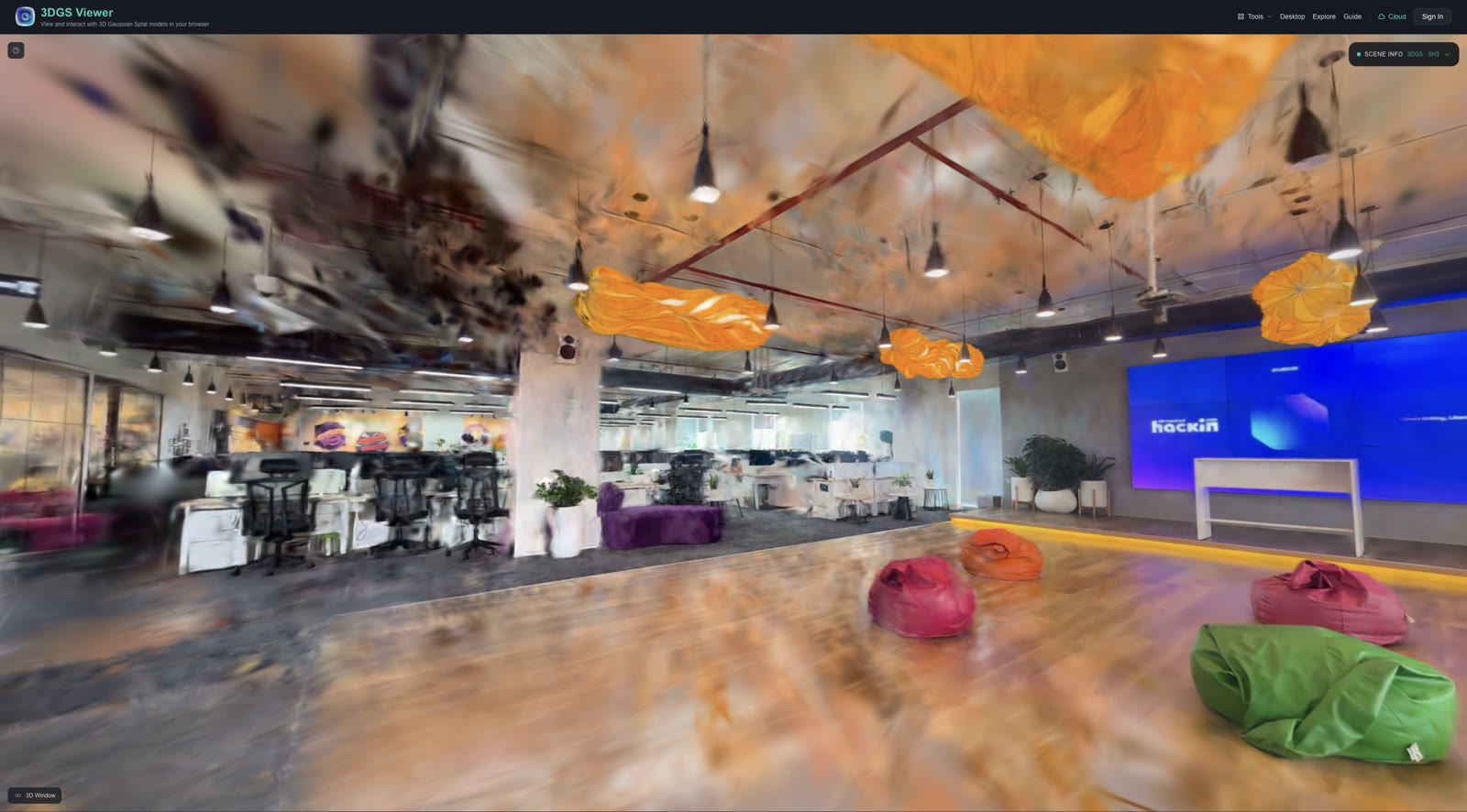 KIRI Engine
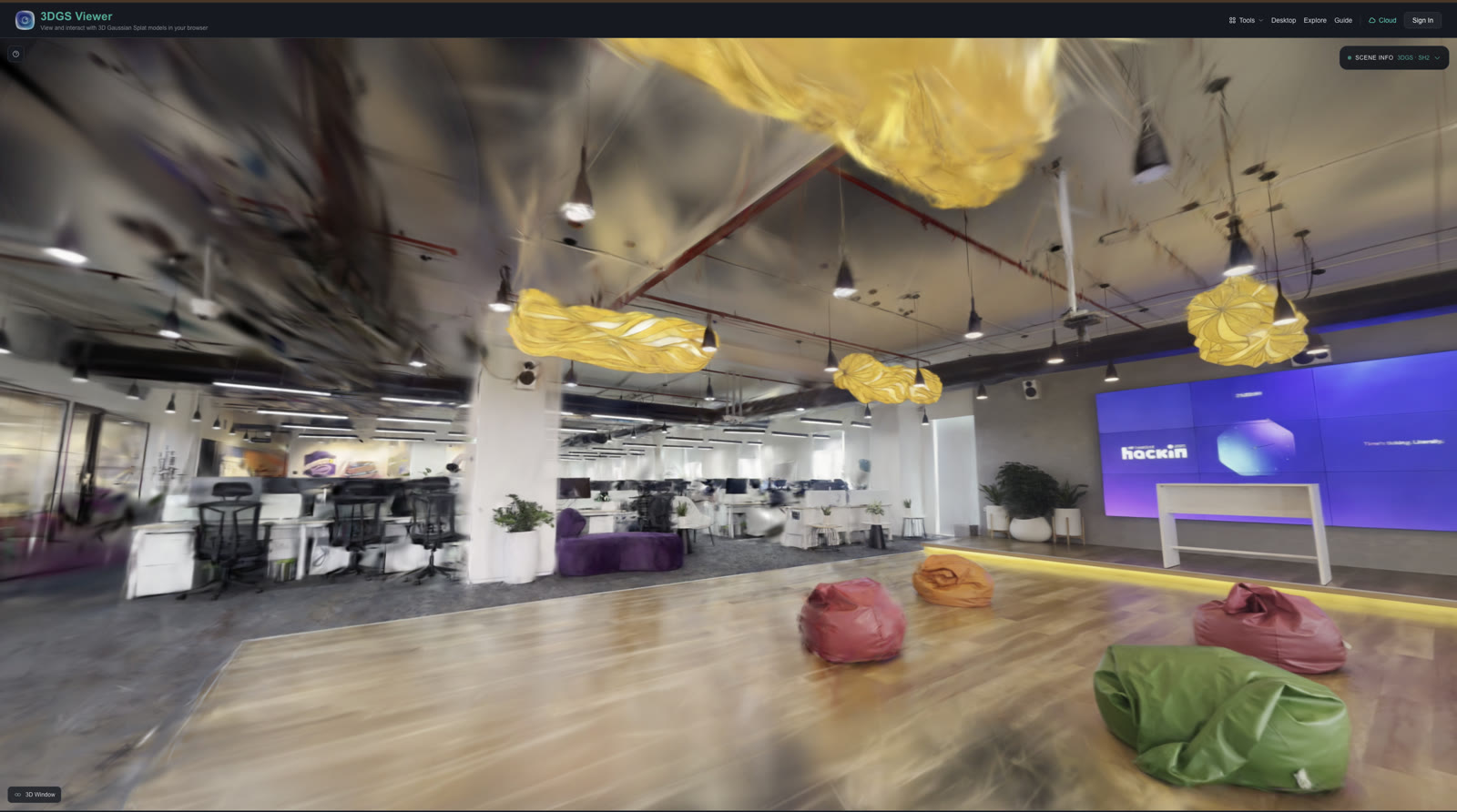 Portal (ours)winner
Signage and screens stay readable — KIRI smears them.
The bilateral grid corrects exposure drift; KIRI's whites blow out.
Cleaner geometry from neural matching + loop-robust global SfM.
Kept honest: KIRI's API caps input at 1080p, while we ran full 4K — so part of this edge is resolution. We still hold the advantage on color and product fit, and we re-confirm head-to-head at matched resolution before claiming a general win.
| KIRI Engine | Portal | |
|---|---|---|
| Input resolution used | 1080p (API cap) | Full 4K |
| Color / exposure | Per-frame drift | Bilateral-grid corrected |
| Built for | General object scans | Constrained-viewing experiences |
| Seat→camera coords | — | Baked in |
| Delivery | App / their cloud | Web-native, your CDN |